Is it possible to have IQ "on top"?

Submitted by viking on 2021/12/28 01:09
Forums

When I drag files to IQ from Outlook, a File Manager, a Browser etc, it would be convenient to temporary be able to put IQ "on top" of the other Windows. In this way, I can select the Window w/o IQ disappearing below it.
Is this already an option? If so, I cannot find it.

(I seem to recall some shareware otherwise that could do it.  I just need to search for it. However, it would be much better if IQ could do it - I would just create a button on the menu)

"Importing" an HDD folder?

Submitted by karelt on 2021/12/27 09:38
Forums

Hi,

I have very little experience with IQ so bear with me, pls (gotta love the wordplay ;-)  )

I have been wondering whether IQ can do the following:

"Import" an HDD folder into the database so the folder appears among other database items more or less like a junction point or a symbolic link - meaning: when files or subfolders in the HDD folder change, it is visible in the database (more or less as if I were looking at the folder using Windows Explorer).

Hyperlinks 2 questions

Submitted by Maxbear35 on 2021/12/20 22:25
Forums

IQ V118H

Hyperlinks

Q1. I setup Firefox as my default browser in Windows 10. Everything works fine. However IQ keeps asking me which program I want to use to open the hyperlink. Am I missing some setting in IQ that tells it I want to always use Firefox?

Q2. I would love to put hyperlinks on my own toolbar in IQ. Is there anyway I do that at this moment.

Thanks.

Is it possible to left justify the properties in the properties pane?

Submitted by viking on 2021/12/18 16:50
Forums

Is it possible to left justify all the properties in the properties pane?
For example, for Basic properties; Some items are right justified (e.g. Created, Modified, By user), some are left justified (e.g. ID Item, Home), and some are center justified (e.g Locked).

I am trying to keep the pane as narrow possible and it is difficult when the items are both left and right justified.

How do I create a dasboard with one window and multiple tabs?

Submitted by viking on 2021/12/18 04:04
Forums

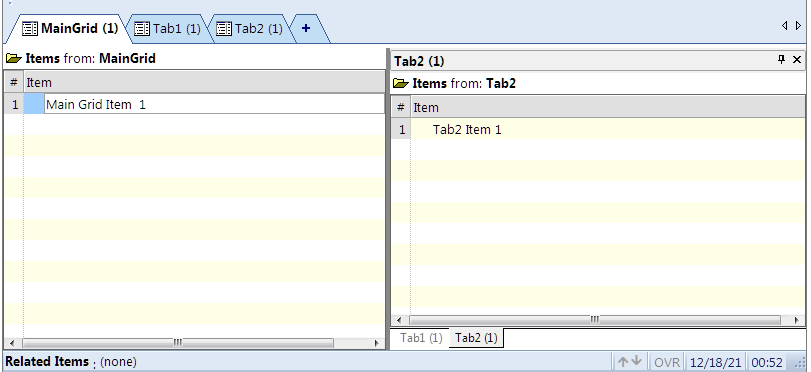
I created a dashboard like this:

z

It shows the 1st main grid, MainGrid, in one window and two grids, Tab1 & Tab2, in another 2nd window.

How do I move Tab1 & Tab2 on top of the MainGrid window so that all three grids are in one window only with three Tabs: MainGrid, Tab1 & Tab2?


Import Items in CSV file as Subitem and/or text in Doc Pane?

Submitted by viking on 2021/12/15 04:37
Forums

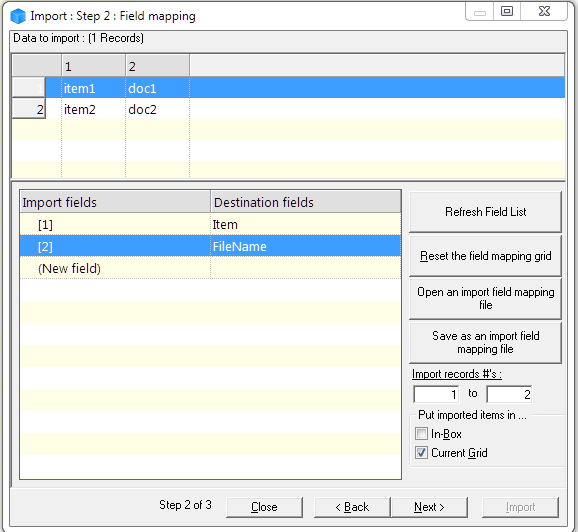
I have a CSV file, with two columns.

Case 1. Is it possible to import the first column's text as a parent (TLI) and the second column's text as its child (Subitem)?
Case 2. Is it possible to import the first column's text as the item text and the second column's text as text in the item's Doc Pane?