Right mouse menu has changed in V118e
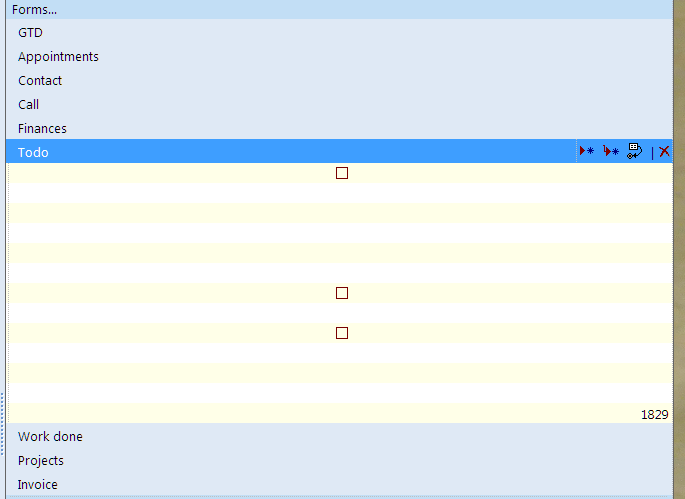
Though I do not have version 'd' to compare with, version 'e' right mouse button menus have changed/reduced.
- Read more about Right mouse menu has changed in V118e
- 5 comments
- Log in or register to post comments
Though I do not have version 'd' to compare with, version 'e' right mouse button menus have changed/reduced.
I assume that this is a bug ? See this screenshot of the Todo form in the Example File:

Windows 7 (x64)
IQ v.118c Portable
EDIT: The Fields are also empty. Tried with new example database and had the same issue.
v.0.9.117c and v0.9.118Pre9 works OK (Forms and Fields are not empty)
Good morning Pierre,
It looks like the OneNote links are not working properly. I am able to save a link but it appears they are not 'parsed' correctly. The second link is now divided into 2 links. I have attached a document to provide further explanation.
Thank you.
Greg
I still get this annoying bug every now and again: I select several items, hit Ctrl-D, choose 'delete entirely from file' and IQ deletes only the first one. Have to issue the command again to delete the rest. Can't reproduce reliably as it occurs only occasionally, though.
So I pasted around ten Ecco notepads for work into IQ via HTML paste and everything seemed to be just hunky-dory.
However, I've now realized that none of the hyperlinks they contain are active in IQ, which is a real bummer. It means I have to edit the item, navigate to the end of the URL, then press Space and Enter. Very time-consuming and irritating. I guess I could fix it by searching for, e. g. "http", showing items in the search box and use an Autohotkey shortcut to complete the above steps automatically per item. Still not exactly an appealing idea.
Hi. When editing in the grid on pressing space after a mailto: link, it becomes active but after closing edit mode with Enter, the hyperlink is gone again.
Cheers!
I want to move several Notepads from Ecco into IQ. I've had all my general stuff in IQ for a couple of years now, and this is the last specifically work-related data that I've still kept in Ecco, so once I finish this process, Ecco can move on to the halls of Valhalla...
The method I wanted to use was File/Database/Export for selected items plus subitems in Ecco (saves to .txt file), then copy text file contents to clipboard and paste as HTML in InfoQube. I tried import from IQ before but there were some errors so this method seemed easier.
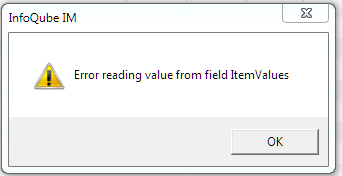
If I select an item in the Inbox (Sample database) and hit the delete key, I get this error message:

I searched for "refresh" and got multiple pages returned. When I click on "page 8", I get a very large error (only the first few lines are shown):
Warning: count(): Parameter must be an array or an object that implements Countable in _filter_url() (line 536 of core/modules/filter/filter.module).
This is in InfoQube v118Pre7.
Cheers