Deleting a SubGrid May Cause Issues
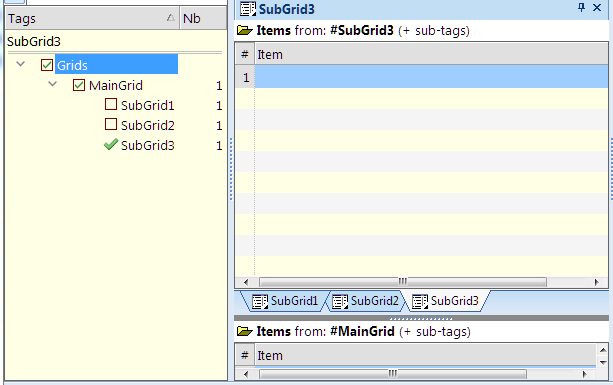
I have a database with a MainGrid and 3 "SubGrids (with Tag Sources):

- Read more about Deleting a SubGrid May Cause Issues
- 1 comment
- Log in or register to post comments
I have a database with a MainGrid and 3 "SubGrids (with Tag Sources):

I have been rearranging my hierarchy of tags in the Tags grid. When I try to select more than one item (e.g. two adjacent items) to move with the arrow keys, I am unable to do so.
I just found out that several of my Items were not assigned to the Tags because the Tags were formatted as Bold.
Steps for Bug1:
Bug2:
Column filter stops working
1) Set up: two vertical tab groups
2) Apply column filter to yes/no column in right pane to display only unchecked items.
3) After a minute or so, the right pane spontaneously refreshes itself and the column filter is lost (all items display).
Tested above 10+ times with same result. Refreshing the screen causes the filter to work again but only for a short period.
Wayne
Win10, 120Pre24
IQ PRE24
CRTL SHIFT 1 closes all outlines - works fine
It used to be that you could select two or more outlines in a view and press CTRL SHIFT 2 to open just the selected outlines. This no longer works
CTRL SHIFT 2 always opens ALL outlines and ignores any selection made.
Hope this can be fixed. Thank you. .
I know you won't be able to reproduce this but I'll report it in case it might be helpful in some way.
I've had this happen several times recently, and again just now:
1) Program instantly "turns off". There's no freeze-up. It just disappears.
2) When I re-open the file:
a) Columns have been lost from the open grid.
b) Outline has been collapsed to one level in the open grid.
I haven't noticed any items lost so far.
Wayne
Win 10, 120Pre21
Find & Filter search results included partial-word matches when "Whole Word only" was specified
Find & Filter search settings = <Entire File/Show in Live Search/Selected Column/Exact String/Whole Word only>
Search = LED
Search results included = pulLED, faiLED (etc)
Changing search to "LED" still included spurious results (though maybe not as many).
Wayne
Win 10 120Pre21
Find and Filter issue
1) Search for text "mop" in grid using Find and Filter (Current View/Filter by Value/Selected Column/Any Keyword/All levels).
2) Filter fails to find "mop".
3) Expand outline to three levels.
4) Run the exact same search again. NOW, it finds "mop".
In short, Find and Filter often fails to find a subitem even though search is set to "all levels" and will only find it if the outline is expanded to show the item.
Maybe not so much a bug as a missing feature: It seems the text shown for reminders does not get updated when user changes the corresponding item's text. So if the text was "Party next Friday" and the user changes this to "Party next Saturday" after the reminder was created, the reminder text will still be for Friday.
Cheers!
1) Change color of one section of item text (remainder stays black). Color cannot be changed again. Text has to be deleted and retyped before color can be changed.
2) Changes in back color don't show unless view is refreshed.
3) Select and copy section of colored text (not black). Paste text in another item. Text color is lost and has to be manually re-assigned each time.
All above is in WYSIWYG.
Wayne
Win 10, 120Pre21