
I have an item that repeats once/day and I have set the alarm at the time.
I have changed the time several times and I now have a lot of alerts including the old alert times.
I have tried to select "Dismiss: All Reminders" for the old times, but it doesn't help. They keep coming back.
I only want to delete the old alert times (not the item).
How do I ?
Comments
You can try: right-click on…
You can try:
HTH !
Sorry, I forgot to mention…
Sorry, I forgot to mention that I already tried "Refresh" and "Cleanup", but it doesn't help.
You can turn off all…
You can turn off all reminders for that file (in IQ, Tools > Reminder options).
Also, if you hover over a reminder (or double-click) you'll see the file that the reminder comes from. It is always possible that you have multiple IQ files that have similar reminders
HTH !
1. I do not want to turn off…
1. I do not want to turn off the reminders. I need them.
2. I only work with one file and I only have one item that has the old "ghost" alarms in a single item.
Maybe I need to create new file with a new item, add the alarms and then email the file it to you?
Try to turn off and back to…
Try to turn off and back to on
Tried many times.
Tried many times.
I have a related question;…
I have a related question; Maybe that is where things get messed up. After I edit the daily repeating event and change the time, I am asked:
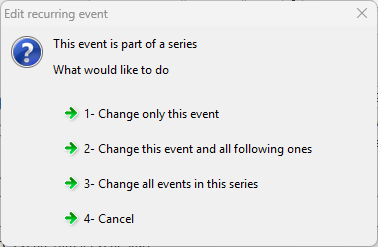
What is the difference between 2 and 3? IQ often creates a new item with the new time instead of just modifying the existing one...
EDIT: (I promptly deleted the new ones so that I only have one item)
Were you able to reproduce…
Were you able to reproduce the issue?
What is the difference between 2 and 3 in the image above?
Turning off the alarms for the item also didn't help.:
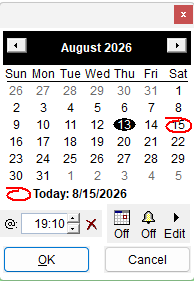
I am getting about 10-15 alarms daily now for this item. I guess the only solution is to delete the item and recreate it.
Maybe it is not possible to create repeating events and then change the time?
I have deleted the item. I…
I have deleted the item.
I have clicked on Events database>Refresh list
I have clicked on Events database>Clean Up...
I am still getting 10-15 alarms daily for this non-existing item.
I do not want to click on Events database>Delete all reminders... because I have a lot of reminders and it will be difficult to recreate them all.
Is there some way to edit the database to remove these alarms? Is it an SQL database? Where is the database located and can it be accessed by some program?
Hi Viking, In your IQBase,…
Hi Viking,
HTH !
Hi Pierre,As I mentioned…
Hi Pierre,
As I mentioned above, I have a lot of reminders in this IQBase. If I delete them all, it will be very difficult to recreate them.
Is there some way that I can edit the database instead to remove only the reminders for the non-existing item?
TIA!
Hi viking, If you do the…
Hi viking,
If you do the above steps, you won't loose any reminders. If you want, you can make a backup of the reminder database, just in case, it is in your user folder, and the name is InfoQube.RemindDB
I followed your instructions…
I followed your instructions but lost a lot of my reminders. I copied back the backup, like you suggested, but it didn't help (of course I had to close IQ when restoring the backup).
I wonder if it could be because of how I have setup some of the reminders?
I have several items which have a ToDo and and an Appointment at the same date/time. I have set the reminder for the ToDo only. It has worked fine before I did the procedure above.
Is this an issue?
I see that the items still have the reminders set for the ToDo time but there are no reminders showing in the Event and Reminders.. Window.
(I now set a reminder for the Appointment for one of the items, and now only the Appointment reminder, but not the ToDo reminder, time is shown in the Window)
are the missing reminders…
are the missing reminders…
They are previous items that have a reminders set for the ToDo but not for the Appointment. They used to show up in the "Events and Reminders.." window before I deleted the database.
so if the missing reminders…
In the next version:
1. so if the missing…
1. so if the missing reminders are from past non-repeating evant, is it a problem?
I think that I misunderstood your question; with past events, I meant that they were created in the past (and they are non-repeating). However, they are for future events.
It is a problem, because I have forgotten which events had reminders (that is why I created reminders in the first place; so I wouldn't forget.......).
I suspect that the cause may that, at least some, items have both a ToDo and an Appointment, and the reminder was only set for the ToDo. Maybe that caused the ToDo reminders to be deleted when disabling/enabling the reminders (because IQ saw that the Appointment didn't have a reminder)?