I've been unable to reliably set tags as grid sources. Sometimes it works and sometimes it doesn't, and I can't figure out why.
Here's the tag "Sidelight" being set as the grid source =
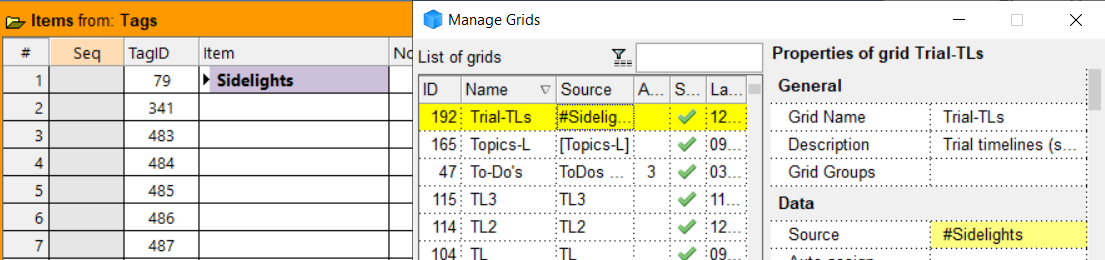
It works correctly =

Now I try setting one of the subtags as the source =
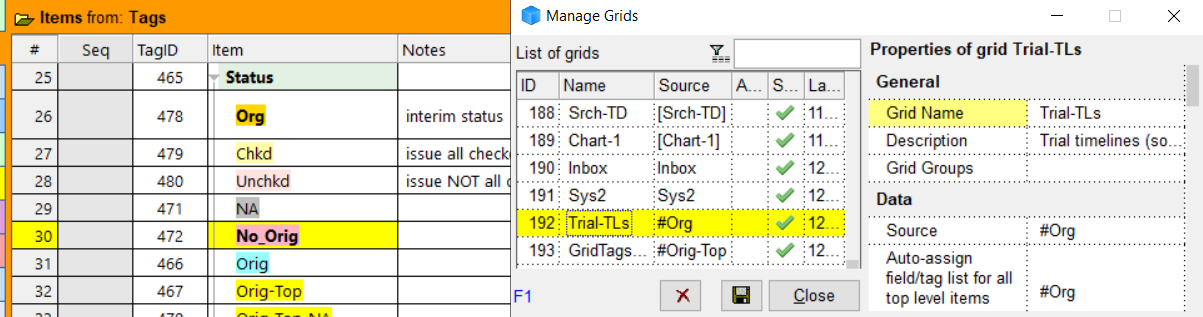
This one shows blank results for the tag #Org even though 20 items have been assigned this tag.

This occurs throughout my tags: some work and some don't. I'm probably doing something wrong but can't figure out what.
Wayne
How do I ?
Comments
Hi Wayne, How many items…
Hi Wayne,
How many items have #Org or a sub-tag assigned?
You can also use the Tag ID as grid source (see doc, I'm not sure of the exact syntax)
As I said, 20 items have…
As I said, 20 items have been assigned the #Org tag. Is that what you're asking?
I can't get TagID numbers to work at all. If i can get the text versions to work, I'll be happy.
oups, missed the 20 items…
oups, missed the 20 items reference. Did you try using the TagID? #[478:Org]:
I looked at some of my tags…
I looked at some of my tags that had duplicates. One of them, tag hard_drive, had both, ID1380 with 10 items, and ID7937 with 1 item.
If I use a grid source of #hard_drive, I get 10 items showing (so it picked up ID1380 only)
If I use grid source #[1380:hard_drive] I get 10 items
If I use grid source #[7937:hard_drive] I get 1 item showing.
It's worth trying #[478] or #[478:Org] and also looking to see if you might have an extra tagid for Org
I've tried every possible…
I've tried every possible combination of the TagID syntax many times. None worked. I just re-tried using the syntax #[1380:hard-drive]. It didn't work. I've tried this particular syntax dozens of times across multiple tags. None worked. I've never been able to get any tags to work based on TagID.
There is no duplicate Org tag (neither by name or ID number).
The #Status tag works. All 10 of its sub-tags don't work. Many other tags also don't work but I haven't done a systematic count of what percentage are working.
I just randomly checked many…
I just randomly checked many tags and they seem to be working now except the tags under #Status. All of those still don't work. When I set the source to one of these tags I get a pop-up saying it's referencing a tag that doesn't exist.
All of these problematic tags still function in the tags pane. When I double-click one, it loads the correct tagged items in the scratch grid.
I could probably create a new set of tags and re-assign all the items to it and I bet they would work. I would still like to know why they're not working now, especially there were many more that weren't working yesterday.
When I double-click one, it…
Can you report back the source bar content for that scratch grid (that works) and the equivalent one when you do it (that doesn't work)
e.g.
There must be something different...
I'm not sure what you're…
I'm not sure what you're asking. The ones that work, work whether I'm using the source bar or manage grids dialogue. Same for ones that don't work.
Tag #Status works =
Tag #Org doesn't work (note that #Org is a subitem of #Status)
To summarize =
1) Tag #Status works
2) All tag subitems of #Status don't work.
3) I just created a new subitem of #Status and it DOES work. So it's just the 11 old subitems that don't work. InfoQube doesn't recognize them as tags (per the message that pops up).
Is there any way to show TagID in the tags pane? I can't easily check for dupes because all my items are organized in outline form and I can't see a full list. I have to rely on column filter to find dupes, and that's often not reliable for me.
Hi Wayne, There is no way to…
Hi Wayne,
There is no way to show the TagID in the Tags pane, but you can show the Tags grid and select the Flat List. This will help identify why some tags do not work
What I wanted to see is as follows. You said that if you double-click on Org (Tags pane) it shows the correct items in the Scratch grid. I wanted to see the source bar (e.g. Items from: xxx) and compare that to when you set a grid source to #Org
I see. Here you go but I I…
I see. Here you go but I I think I just found the difference. The tags that don't work have inline highlighting. The ones that do work have cell highlighting. That's why InfoQube doesn't see a match?
Testing seems to confirm my speculation. New tag works. New tag stops working when inline highlighting is applied. New tag starts working again when highlighting is removed (though sometimes it takes some fiddling for it to finally recognize the revised tag).
Ah yes, that is clearly it…
Ah yes, that is clearly it. The Doc is also clear that embedded formatting is not allowed
https://infoqubeim.com/drupal5/index.php/node/4328#:~:text=2.%20Tags%20Grid,use%20embedded%20formatting)
Yep, it was there but it…
Yep, it was there but it never sank in despite several re-readings of the whole section.